
Гүл дүкеніне арналған мобильді қосымша жасау
Гүл дүкеніне арналған мобильді қосымша жасау
Кіріспе
Гүл дүкеніне арналған мобильді қосымша жасау — бұл бизнесті жүргізушілер жиі қоятын міндеттердің бірі. Гүлдердің онлайн-сатылымы өсуде: клиенттер мерекелерге букет тапсырамыз деп жазады, жеткізуді нақты уақытқа тағайындайды және бұл процесті смартфон арқылы бірнеше басу арқылы жасауды қалайды, директтегі жазысулар арқылы емес.
Instagram, WhatsApp және телефон арқылы тапсырыстарды өңдеу — белгілі бір уақытқа дейін жұмыс істейтін схема. Ағын өсіп кеткенде хаос басталады: өтініштер жоғалып кетеді, жеткізілімдер шатасады, флорист не жинау керектігін білмейді. Өзіңіздің қосымшаңыз бүкіл процесті жүйелейді — букет таңдаудан бастап жеткізілімді растауға дейін.
Неге гүл дүкеніне мобильді қосымша қажет
Онлайн-тapсырыстардың өсуі және клиенттердің күтулері
Гүл — импульстік әрі оқиғаға байланысты тауар. Клиент түскі уақытта әріптесінің туған күнін есіне алып, қазір-ақ жеткізуді рәсімдегісі келеді. Егер сіздің дүкенде ыңғайлы онлайн-тapсырыс болмаса — ол қосымшаға ие бәсекелеске барады.
Гүл дүкендерінің аудиториясы басқа e-commerce салаларындағыдай деңгейдегі қызметті күтеді: суреттермен каталог, жеткізу күнін және уақытын таңдау, шұғыл растау. Қосымша осы барлық күтулерді жабады.
Қайталама сатылымды және адалдықты арттыру
Гүлдерді жиі сатып алады — туған күндерге, мерейтойларға, корпоративті шараларға. Қосымша қажетті сәтте өзіңізді еске салуға мүмкіндік береді: профильге сақталған датаға апта бұрын push-хабарлама, тұрақты сатып алушыларға жеке жеңілдік, жаңа маусымдық композициялар туралы хабарлама.
Қосымшаның ішіндегі адалдық бағдарламасы гүл бизнесінде ерекше тиімді жұмыс істейді: клиент ұпай жинап, келесі букет үшін «өз» дүкеніне қайта оралады, әрдайым жаңасын іздемейді.
Тапсырыстар мен жеткізуді автоматтандыру
Флорист хабарламалардан емес, букет құрумен айналысуы керек. Қосымша тапсырыстарды автоматты түрде қабылдайды, флорист үшін кезекті қалыптастырады, клиентке жинау статусы мен курьердің шығуы туралы хабарлама жібереді. Қол жұмысы аз — қателер аз және сапаға көбірек уақыт.
Гүлге тапсырыс беру қосымшасы қалай жұмыс істейді
Клиенттің тілектен жеткізіңге дейінгі жолы:
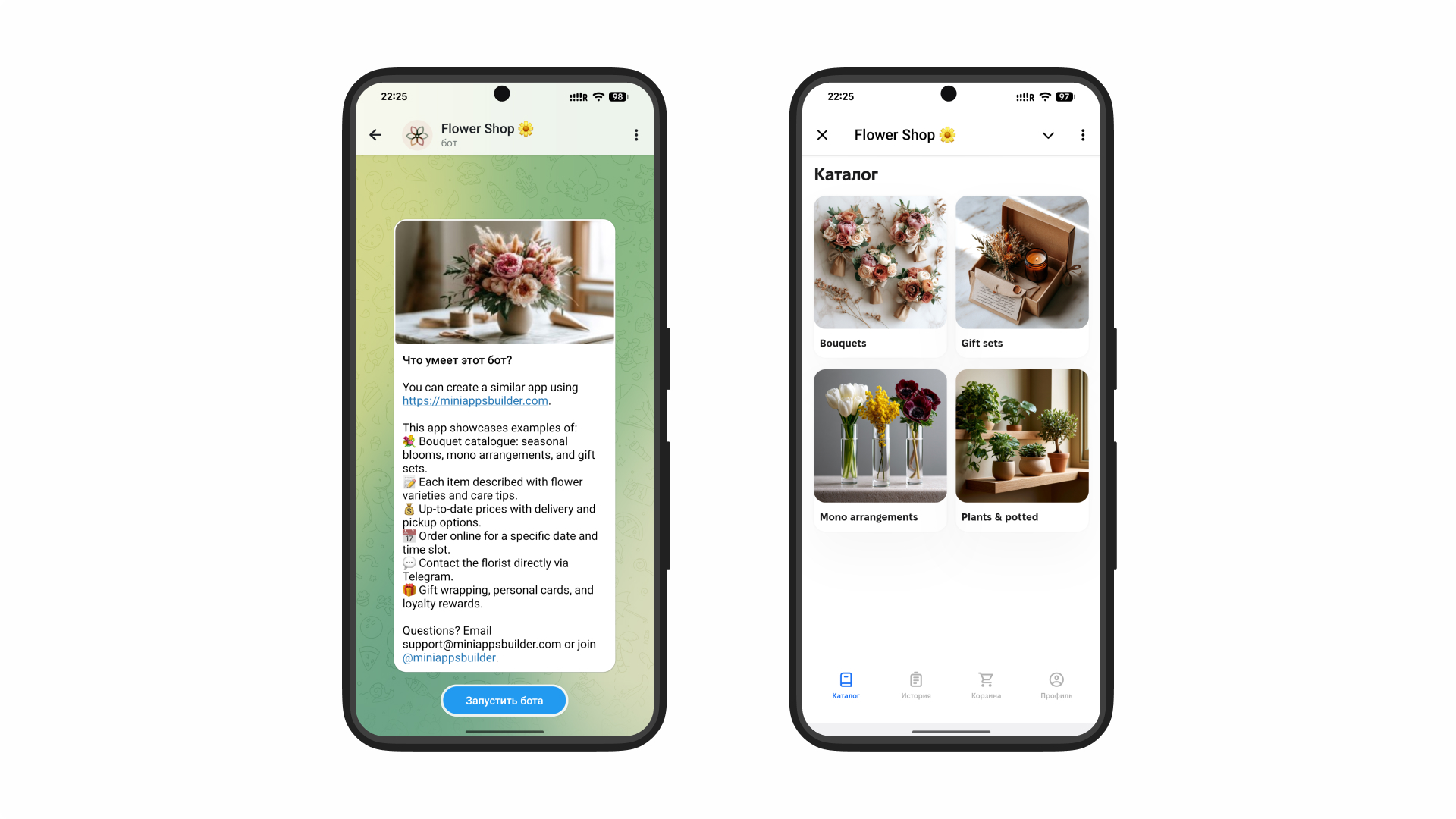
- Каталогты ашады — бөлімдерді көреді: букеттер, монобукеттер, композициялар, сәндік өсімдіктер, корпоративті тапсырыстар
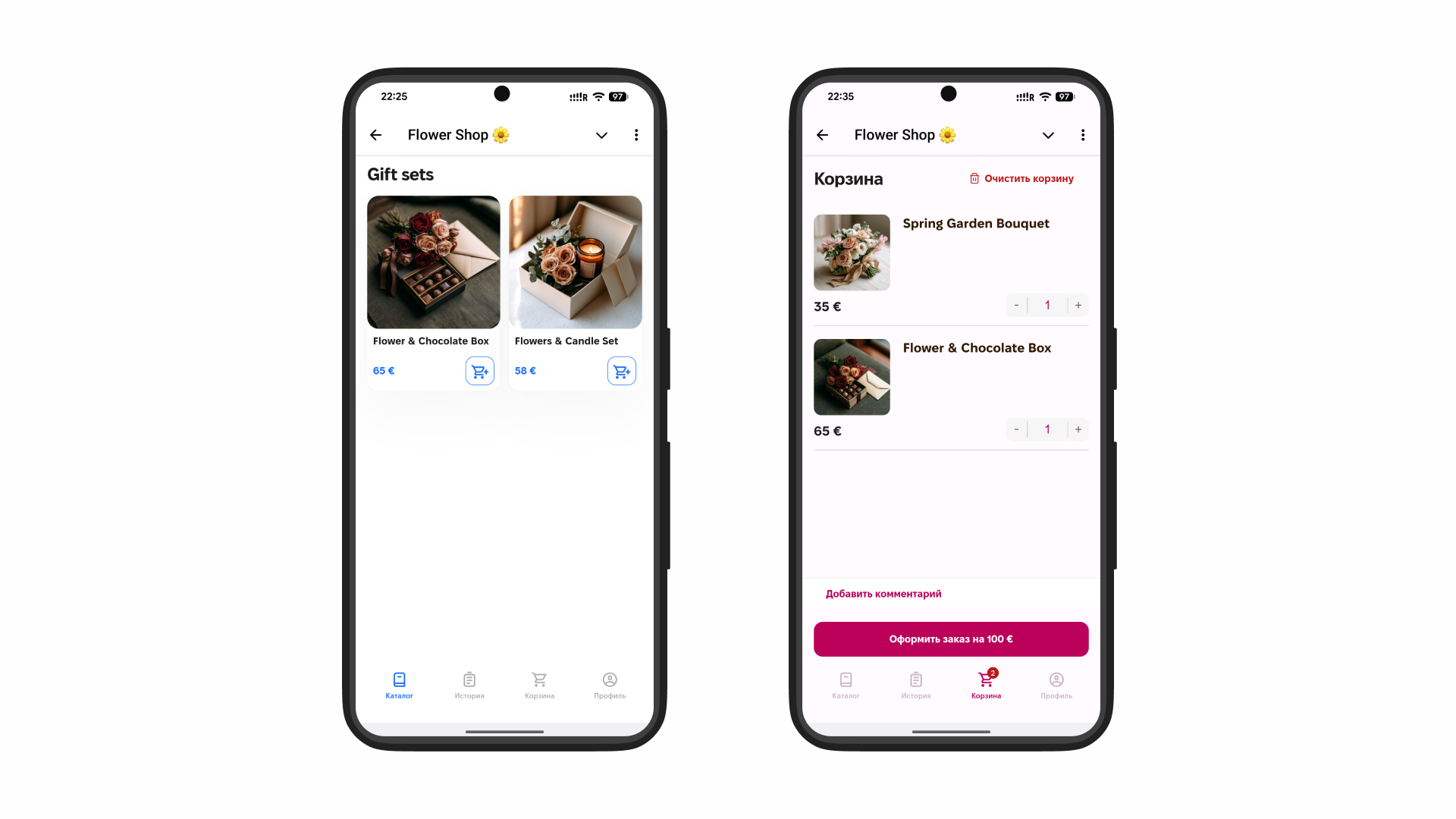
- Букет таңдайды — фото, құрамы, бағасы, өлшем нұсқалары
- Тапсырысты баптайды — ашықхат қосады, орау таңдайды, флористқа тілектерін жазады
- Жеткізуді таңдайды — өз бетімен алу немесе курьер, күнін және нақты уақытын көрсетеді
- Төлем жасайды — картамен немесе электронды әмиян арқылы тікелей қосымшада
- Хабарламалар алады — тапсырыс растығы, жинау статусы, курьердің шығуы
- Курьер букет әкеледі — алушы қанағаттанған, тапсырыс беруші қанағаттанған
Бүкіл процесс 2–3 минутты алады. Ешқандай жазысулар, нақтылаулар және менеджердің жауабын күту болмайды.
Тұтынушыларға арналған функционал
Букеттер мен композициялар каталогы
Гүл дүкенінің каталогы — сату жасайтын витрина. Сапалы фото, категориялар бойынша бөлу (раушандар, пионы, тюльпан, экзотика, кептірілген гүлдер), баға мен себеп бойынша сүзгілер («туған күнге», «үйлену тойына», «тек осылай») — бәрі клиентке қажет нәрсені тез және қоңыраусыз табуға көмектеседі.
Гүл дүкеніне маңызды бөлшек: өнімді вишлистке қосу және букетке сілтеме бөлісу мүмкіндігі — сыйлық таңдағанда танымал механика.
Тапсырыс рәсімдеу және жеткізу
Икемді тапсырыс параметрлері — бәсекелік артықшылық. Клиент сыйлық орамасын қажет пе, букет мөлшері қандай болсын, ашықхатқа не жазу керектігін таңдайды. Жеткізу мекен-жайы профильде сақталады, жеткізу уақыты сағаттық дәлдікпен қолжетімді слоттардан таңдалады.
Корпоративті клиенттер үшін — қайталанатын тапсырысты рәсімдеу мүмкіндігі: мысалы, әр жұмада кеңсеге гүлдерді жеткізу.
Онлайн-төлем және хабарламалар
Құралға кіріктірілген карта арқылы төлем, СБП немесе электронды әмияндар — міндетті элемент. Төлем жасаған клиент соңғы сәтте тапсырысты жоймайды.
Хабарламалар әр кезеңде жұмыс істейді: растау, «флорист жинауды бастады» статусы, «курьер шықты», «жеткізілді». Бұл «менің букетім қайда?» деген сұрақтар саныны нөлге дейін азайтады.
Жеке кабинет
Жеке кабинеттің ішінде сақталады:
- бір рет басып қайталау мүмкіндігі бар тапсырыстар тарихы
- сақталған жеткізу мекен-жайлары
- маңызды даталар (туған күндер, мерейтойлар) — еске салғыштарымен
- бонус ұпай балансы
- таңдаулы букеттер мен композициялар
«Маңызды даталар» функциясы гүл бизнесі үшін бірегей құрал: клиент бір рет даталарды қосады, қосымша 3–7 күн бұрын еске салады және тапсырыс рәсімдеуді ұсынады.
Бизнес иелері үшін функциялар
Тапсырыстар мен жеткізуді басқару
Басқару панелі нақты уақыт режимінде барлық белсенді тапсырыстарды көрсетеді: флорист не жинап жатыр, не курьерді күтуде, не жеткізілген. Жеткізу слоттарын баптауға болады, белгілі бір уақыт аралығында тапсырыс көлемін шектеуге және шұғыл күндерде қабылдауды жабуға болады.
CRM және клиент есебі
Кіріктірілген CRM әр клиенттің толық тарихын сақтайды: тапсырыстар жиілігі, орташа чек, гүлдер мен бюджет бойынша қалаулары. Бұл VIP-сатып алушыларды анықтауға, «ұйықтап қалған» клиенттерді жеке ұсыныстармен қайтаруға және сегменттелген хаттамалар құруға мүмкіндік береді.
Сату аналитикасы
Автоматты есептер: табысы бойынша ең танымал букеттер, тапсырыстардың шыңды күндері (8 наурыз, 14 ақпан, 1 қыркүйек), кезеңдер бойынша орташа чек, акциялардың тиімділігі. Бұл гүлдерді нақты сұранысқа сәйкес сатып алуға көмектеседі, интуицияға сүйеніп емес.
Сайтпен және төлем жүйелерімен интеграциялар
Қосымша гүл дүкенінің сайтымен, онлайн-төлем жүйесімен және қажет болған жағдайда курьерлік сервистермен синхронданады. Біртұтас тапсырыс базасы деректерді қолмен көшіру кезіндегі қайталанулар мен қателерді болдырмайды.
Мобильді қосымша әзірлеу технологиялары
Telegram Mini Apps — Telegram ішінде дүкенді жылдам іске қосу
Telegram Mini App — Telegram ішіндегі толыққанды гүл дүкені. Клиент ештеңе жүктемейді: сіздің дүкен боты ашып, дереу букеттер каталогын, себетті және төлемді көреді.
Неге бұл гүл бизнесі үшін жұмыс істейді:
- Көптеген СНГ елдеріндегі гүл сатып алушыларда Telegram бар — кіру кедергісі нөлге жақын
- Тапсырыс статусы мен акциялар туралы хабарламалар мессенджерге тікелей келеді және оқу көрсеткіші жоғары
- Telegram Payments арқылы кіріктірілген төлем
- Mini Apps Builder конструкторы арқылы 1–2 аптада іске қосу
- Шығындар айына $12-нан бастап — кішкентай дүкенге де қолжетімді
- Техникалық команданы талап етпейді
Түпнұсқа мобильді қосымшалар (iOS/Android)
App Store және Google Play-дегі бөлек қосымша — максималды функционал, бірақ сонымен бірге максималды шығындар.
- Әзірлеу: 4–8 ай
- Шығын: екі платформаға $15 000–70 000+
- Клиент қосымшаны жүктеуі керек — аудиторияның бір бөлігі жоғалуы мүмкін
- Тұрақты жаңартулар: айына $500–2 000
Бұл федералдық гүл дүкендері желілері үшін justified таңдау — үлкен айналымы бар кәсіпорындарға сай.
Қосымша конструкторлары
No-code платформалар (Glide, Adalo) негізінен әзірлеушісіз базалық дүкен құруға мүмкіндік береді. Telegram Mini Apps-тан қымбөтірек және баптауы күрделірек, бірақ нәтижесі ұқсас.
- Платформаның құны: $50–400/ай
- Баптау уақыты: 2–4 апта
- Клиент әлі де қосымшаны жүктейді
- Арнайы функциялар (маңызды даталар, жеткізу слоттары) қосымша доработканы талап етеді
Гүл дүкеніне қосымша жасау қаншаға түседі
| Нұсқа | Іске қосу құны | Мерзім | Қолдау |
| Telegram Mini App (конструктор) | айына $12 бастап | 1–2 апта | Қамтылған |
| Қосымша конструкторы | $500–3 000 + $50–400/ай | 2–4 апта | Жартылай ақылы |
| Түпнұсқа әзірлеу (iOS + Android) | $15 000–70 000+ | 4–8 ай | $500–2 000/ай |
Құнға әсер ететін факторлар:
- Каталог — позициялардың саны, букеттердің вариативтігі, фотосуреттер
- Жеткізу — слоттар, аймақтар, курьерлік сервистермен интеграция
- Онлайн-төлем — эквайринг пен төлем жүйелерін қосу
- CRM және аналитика — иесіне арналған функционал деңгейі
- Брендинг — фирмалық дизайн немесе стандартты шаблондар
- Интеграциялар — сайт, касса, мессенджерлер
📌 Қорытынды: гүл дүкеніне қосымшаны Telegram Mini App арқылы жасау — көптеген гүл дүкендері үшін оптималды старт. Минималды инвестициялар, екі апта ішінде іске қосу, толық базалық функционал.
Бизнесті үшін лайықты шешімді қалай таңдау керек
Кішігірім гүл дүкені үшін
Бір нүкте, 1–3 флорист, қала бойынша жеткізу — Telegram Mini App барлық міндеттерді жабады. Онлайн-тapсырыс, төлем, хабарламалар, адалдық бағдарламасы — айына $12–50 аралығында және техникалық командасыз.
Гүл дүкендері желісі үшін
Бірнеше нүкте болғанда біртұтас CRM, жинақталған аналитика және тапсырыстарды орталықтан басқару маңызды. Мұнда API-интеграциялар бар кеңейтілген Mini App конфигурациялары немесе түпнұсқа әзірлеуді қарастыру қажет.
Нұсқаларды салыстыру
| Критерий | Telegram Mini App | Конструктор | Түпнұсқа әзірлеу |
| Іске қосу жылдамдығы | ★★★ | ★★ | ★ |
| Шығын | ★★★ | ★★ | ★ |
| Клиент үшін кедергі | Минималды | Орташа | Жоғары |
| Жеткізу функциясының мүмкіндіктері | Негізгі | Орташа | Толық |
| Масштабталу | ★★ | ★★ | ★★★ |
Іс-әрекеттер мен қолдану мысалдары
Мысал 1. Қалалық гүл дүкені, қала бойынша жеткізу
Қосымшаны іске қоспай тұрып тапсырыстар Instagram және телефон арқылы қабылданатын. Флорист жазысуға уақыт жұмсайды, жеткізу мекен-жайларында қателіктер болған. Telegram Mini App арқылы гүл дүкеніне қосымша жасағаннан кейін клиенттер тапсырыстарды өздері бере бастады. Жеткізілімдегі қателіктер 80% төмендеді — клиент өзі мекен-жай енгізіп, нақты уақытты таңдайды. Тапсырыстар ағыны 35% өсті: жазысу арқылы сатып алуға дейін жеткізбейтін бөлік сатып алушылар болды.
Мысал 2. «Маңызды даталар» бағдарламасы бар дүкен
Иесі қосымшаға есте сақтау күндерін сақтау функциясын қосты. Әр датаға 7 күн қалғанда клиентке тапсырыс жасау ұсынысы бар push келеді. Үш айдан кейін тапсырыстардың 42% — «еске салғыштан» келіп отырды — қосымша жарнама бюджетінсіз. Орташа сатып алу аралығы 45-тен 28 күнге дейін қысқарды.
Мысал 3. Қосымша арқылы корпоративті тапсырыстар
Компания кеңсеге тұрақты тапсырыс орнатты: әр жұмада — қабылдау үстеліне екі букет, корпоративті картамен автоматты төлем. Дүкен менеджері әр апта сайын растау үшін қоңырау шалуды тоқтатты — тапсырыс автоматты түрде қалыптасады. Мұндай клиент маркетинг шығындарысыз тұрақты табыс әкеледі.
Жиі қойылатын сұрақтар (FAQ)
Кішігірім гүл дүкеніне қосымша қажет пе?
Иә. Тіпті бір флористі бар дүкен де тапсырыстарды қабылдауды автоматтандырудан пайда көреді. Клиент тапсырысты өзі толтырады, флорист нақты тапсырма алады, қателер аз болады. Telegram Mini App айына 3–5 қосымша тапсырыс болғанда өзін ақтайды.
Жеткізу мен төлемді қосуға бола ма?
Иә. Telegram Mini Apps кіріктірілген онлайн-төлемді және жеткізу слоттарын қолдайды. Курьер сервисімен интеграция API арқылы қолжетімді.
Іске қосу қанша уақыт алады?
Mini Apps Builder арқылы — 1–2 апта. Түпнұсқа әзірлеу — 4–8 ай. Егер онлайн-тapсырыстарды тез қабылдауды бастау керек болса — таңдау айқын.
Қолданыстағы клиенттерді Instagram-нан қосымшаға қалай көшіруге болады?
Ботқа сілтемені профиль шапкасына қойыңыз, сату нүктесінде QR-код қосыңыз, қосымша арқылы алғашқы тапсырысқа бонусты жариялайтын пост жасаңыз. Активті жарнамамен көшу 2–4 аптаға созылады.
Қосымша арқылы сәндік өсімдіктер мен гүлсұлбаларды сатуға бола ма?
Иә. Каталог кез келген ассортиментке бапталады: кесілген гүлдер, букеттер, өсімдіктер, горшоктар, аксессуарлар — бәрі бір қосымшада.
Қорытынды
Гүл дүкеніне қосымша жасау — қолмен жүргізілетін хаостан тапсырыстарды қабылдайтын, клиенттердің маңызды даталарын еске салатын және қосымша жарнама қажетсіз сатып алушыларды қайтаратындай жүйеге өту.
Негізгі артықшылықтары:
- Онлайн-тapсырыс 24/7 — клиент кез келген уақытта букет рәсімдей алады, жазысусыз
- Автоматты хабарламалар — «тапсырысым қайда?» деген сұрақтар азаяды
- Маңызды даталар — жарнама бюджетінсіз ұстап қалу құралы
- Адалдық бағдарламасы — тұрақты клиенттер жиі қайтады
- Аналитика — сатып алуды нақты сұранысқа қарай жоспарлау, интуицияға сүйенбеу
Telegram-да гүлдердің онлайн-дүкенін тез және үлкен инвестициясыз іске қосқыңыз келе ме? Mini Apps Builder каталог, жеткізу және онлайн-төлемі бар гүл дүкенінің қосымшасын 1–2 аптада жасауға мүмкіндік береді. Тегін көріп көріңіз.
- КіріспеНеге гүл дүкеніне мобильді қосымша қажетОнлайн-тapсырыстардың өсуі және клиенттердің күтулеріҚайталама сатылымды және адалдықты арттыруТапсырыстар мен жеткізуді автоматтандыруГүлге тапсырыс беру қосымшасы қалай жұмыс істейдіТұтынушыларға арналған функционалБукеттер мен композициялар каталогыТапсырыс рәсімдеу және жеткізуОнлайн-төлем және хабарламаларЖеке кабинетБизнес иелері үшін функцияларТапсырыстар мен жеткізуді басқаруCRM және клиент есебіСату аналитикасыСайтпен және төлем жүйелерімен интеграцияларМобильді қосымша әзірлеу технологияларыTelegram Mini Apps — Telegram ішінде дүкенді жылдам іске қосуТүпнұсқа мобильді қосымшалар (iOS/Android)Қосымша конструкторларыГүл дүкеніне қосымша жасау қаншаға түседіБизнесті үшін лайықты шешімді қалай таңдау керекКішігірім гүл дүкені үшінГүл дүкендері желісі үшінНұсқаларды салыстыруІс-әрекеттер мен қолдану мысалдарыЖиі қойылатын сұрақтар (FAQ)Қорытынды