YooKassa
How to set up sending receipts to customers and the tax authorities.
To comply with the requirements of the Federal Tax Service (FTS) of Russia, you need to set up sending receipts after payment for goods and services in your Telegram Mini App.
Important
Be sure to consult your accountant!
YooKassa provides receipt settings in accordance with FTS requirements, but there are many configurations — including agency schemes.
Configuring receipts
In the "Payment methods" section, after connecting YooKassa as the online payments provider, you must immediately configure the receipt parameters — otherwise an error will occur when attempting payment (this is a characteristic of the service). Figure 1 shows the receipt settings interface.
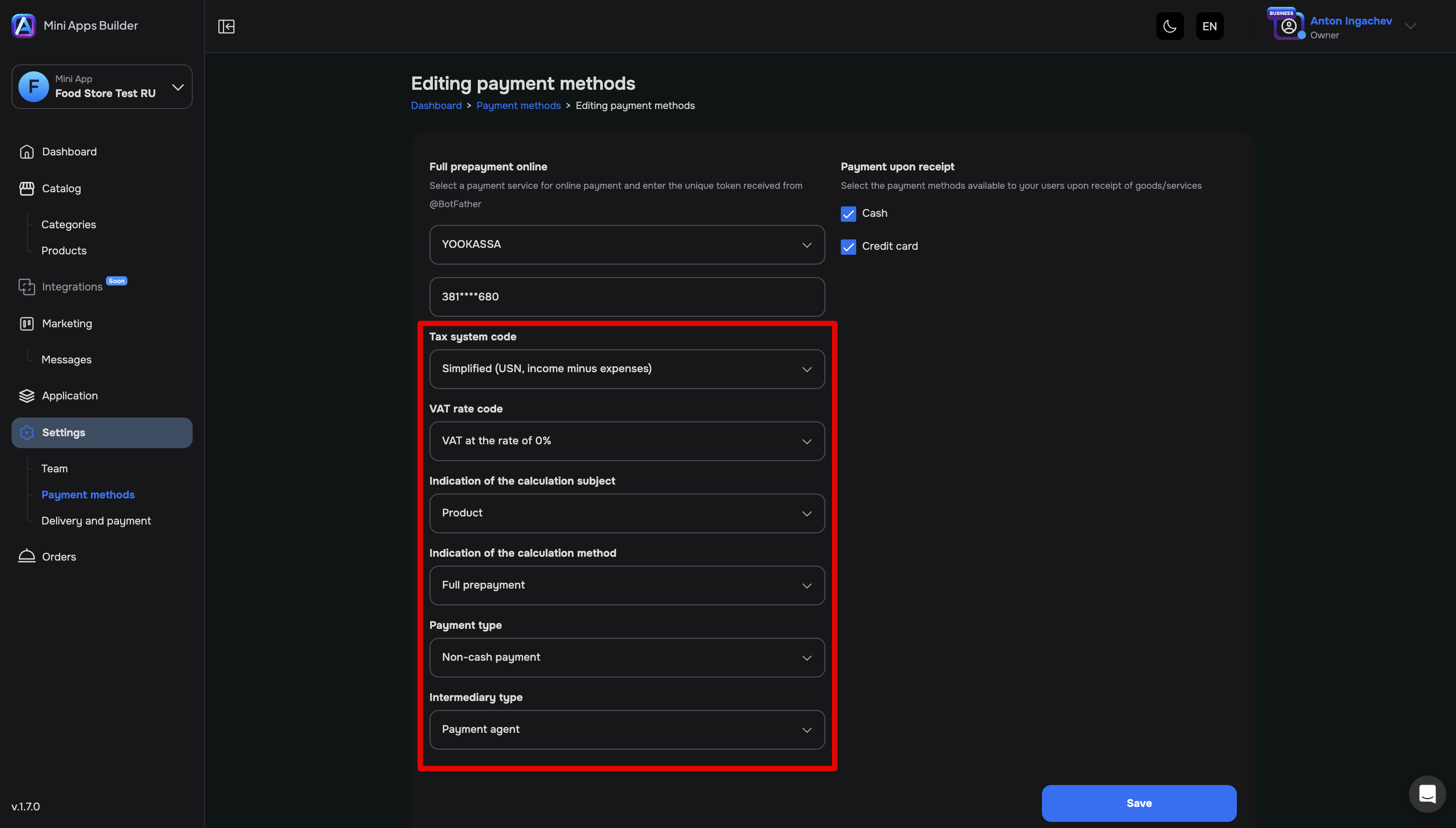
The first four fields are required:
- Tax system code VAT rate code Type of payment item Type of calculation method
The last two fields are optional:
- Transaction type Intermediary type
After completing the receipt configuration you will be able to accept payments in the app via YooKassa.
Official YooKassa documentation
The official setup documentation is available on the YooKassa website.
If you have any questions, contact us by any convenient method.











