
Update 1.54.0: GIF in product cards and Random Coffee rules
In Mini Apps Builder 1.54.0, you can upload a GIF for products, services, and categories. In the mini app, such an image is animated. The release also includes pair-matching rules in Random Coffee and fixes in the dashboard.
Dashboard: GIF in cards
The image for a product, service, or category can now be uploaded in GIF format. In the store "Promo codes and promotions," GIF is suitable for the offer image and business logo. The field hint says: "JPG, JPEG, GIF, PNG format, size no more than 5 MB".
In the mini app, the GIF is shown in the card and animated. Mailings, ads, and the account avatar do not support GIF.
Dashboard: Random Coffee rules
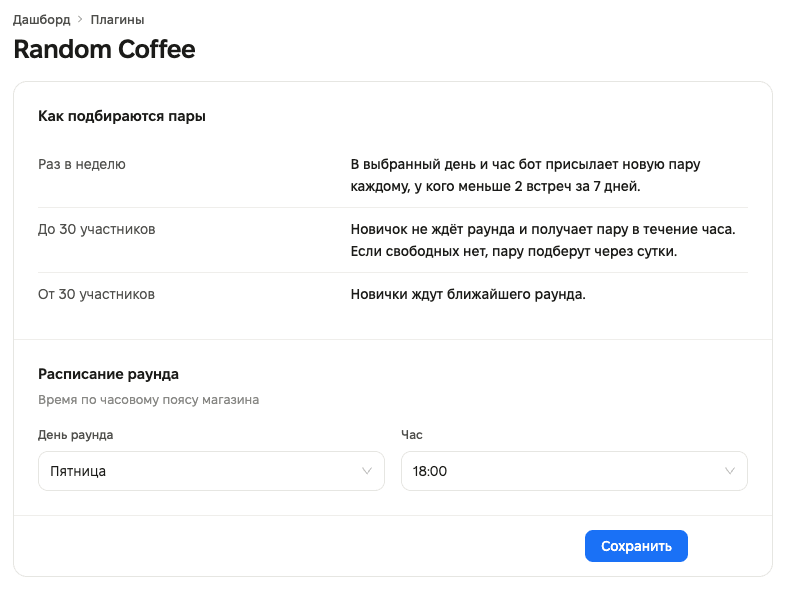
The Random Coffee plugin page has been updated. The "How pairs are matched" block explains the rules:
- "Once a week": on the selected day and hour, the bot sends a new pair to everyone who has fewer than 2 meetings in 7 days.
- "Up to 30 participants": a new user does not wait for a round and receives a pair within an hour. If there are none available, a pair will be assigned in a day.
- "From 30 participants": new users wait for the next round.
The day and hour of the round are set in the "Round schedule" block, and the time is based on the store's time zone.
Fixes
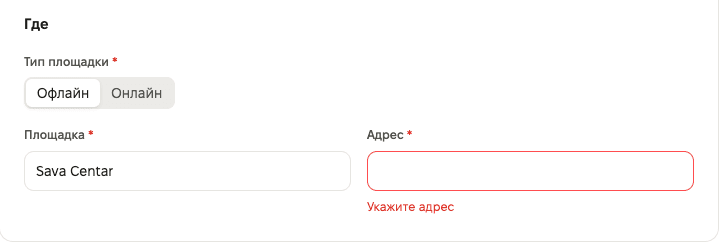
- An offline event without a venue or address is no longer saved. The empty field now shows the error "Specify a venue" or "Specify an address". If publishing fails, the dashboard opens the "Main information" tab and shows "For an offline event, specify a venue and address".
- In a store with the USDT currency, the product, service, and promo offer form no longer crashes when entering a price. The preview shows the price in USDT, for example 12.5 USDT.
- While the step-by-step store setup is not finished, you can change the currency, access, and store name. Previously, saving resulted in an error.
- Site sign-in is preserved after restarting the browser, including in Chrome on Android. The "Remember me" checkbox is now enabled by default.
- Course files and ticket photos are again delivered to customers in Telegram. If Telegram does not accept the file, for example if the file is larger than 50 MB, the customer receives a link to it.
- On mobile, the support button no longer covers the "Save" button at the bottom of the form.
We also fixed minor issues and improved service stability.