Chats
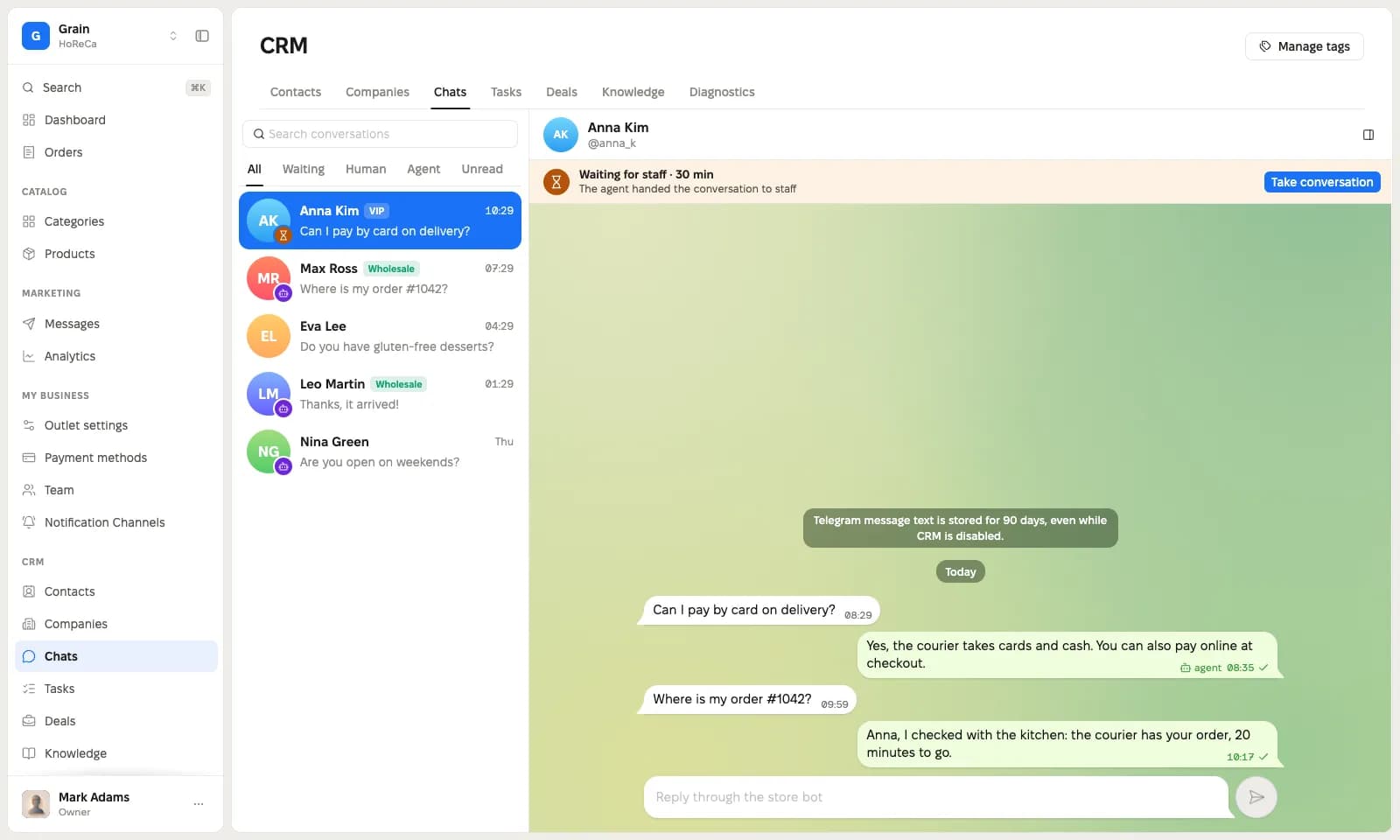
All bot dialogs in one list. Your reply goes to the customer through the same bot.
- all dialogs
- Agent · Waiting · Manager
- reply through the bot
Customers write to your bot in Telegram. An AI agent answers from your knowledge base, your team takes the hard dialogs, and every customer goes straight into the CRM.
Support usually lives in three services. Here it lives in one bot.
The dialog lives while the tab is open
Its own settings and its own history
Contacts are copied by hand
Chats, the AI agent and customers in one dashboard. The customer writes in Telegram, and the history stays with you.
Chats, the AI agent and the CRM work with the same customers. No copying contacts, no looking for history in three places.
All bot dialogs in one list. Your reply goes to the customer through the same bot.
Answers from the published knowledge base articles. When it has no answer, it hands the dialog to your team.
A contact from every dialog, companies, tags and a manager. Deals on a board and tasks with due dates.
This is the CRM in the dashboard. Switch the tabs to see each section.
A customer writes to the bot in Telegram, and the dialog shows up in the CRM. You see who answers now: the agent or a manager.
Put a button with a link to the bot on your site. No code to install.
If the customer opened your mini app, the agent answers about their orders and order status.
Employees with access to customers see the CRM. The rest of the team does not.
The customer writes in another language? Translate the dialog in the chat with one button.
Our own support runs on this CRM. Write to our bot in Telegram and see how the agent answers and when the team steps in.
From sign-up to the agent's first answer.
The agent stays off until you turn it on. Until then your team answers the dialogs.
The CRM is part of the subscription. The first 14 days are free, no card needed.



Did not find an answer? Write to the support chat on the site.
Yes, as a button with a link to the bot. There is no chat window on the site: the customer goes to Telegram, and the dialog shows up in the CRM.
From the published knowledge base articles. The agent does not see drafts.
The agent hands the dialog to your team. The dialog gets the status «Waiting for a manager», and an employee answers through the same bot.
No. The agent sees only the «Agent context» field. The internal note stays with your team.
Yes. The agent is off by default, and your team answers every dialog.
Not yet. The CRM shows text messages.
Message text is kept for 90 days. Contacts, companies, deals, tasks and notes stay in the CRM.
No. A project and a bot are enough for support. With a mini app, the agent also sees customer orders.
Chats, an AI agent and a CRM in one dashboard. 14 days free.